Fill every shift from your own staff, and know every visit was made.
The rota, the runs and the clock-ins in one place — without buying a care records system.
Only staff qualified for the shift are suggested, nights are shared out fairly, and gaps go to your own team before you ring an agency.
One service runs alongside your current rota for two weeks before anything is switched over.

- Hosted in London
- No health records
- Every change logged
- Microsoft 365 sign-in
The week
Every gap visible before the phone rings
One screen per service: who is on, who is short, and what is waiting on a decision. Anyone the rules would turn down is named with the reason.
- A half shift is two people on one requirement, not one person on two.
- Hours sit against each person's contract, so the answer to “who's over?” is already on the page.
- The week prints for the office wall, and the calendar follows the clock changes without a second rota.
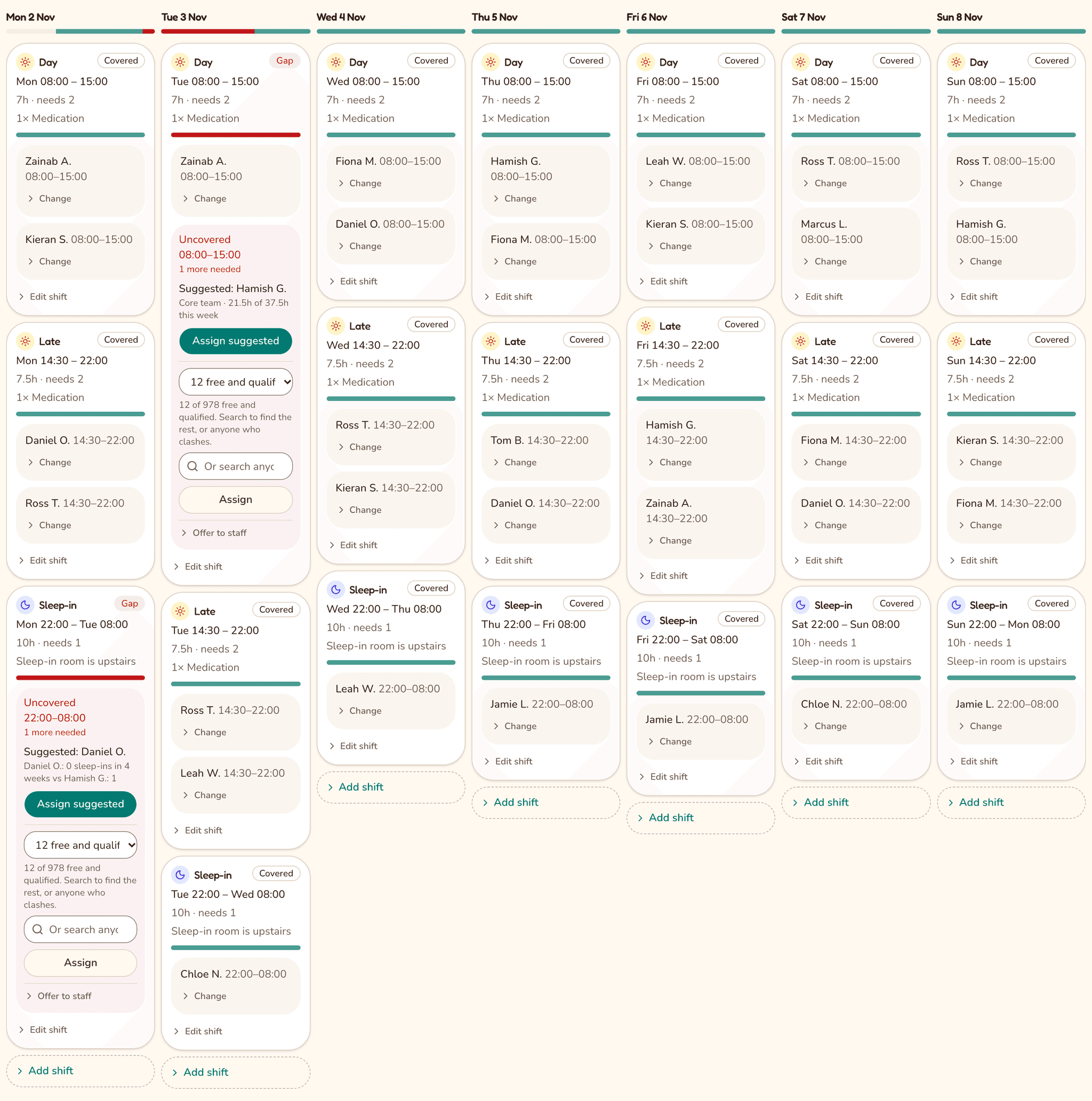
The week for one service, with two gaps and who Carefill suggests for each, from the demo organisation. Made-up data.
Who it's for
One rota, three quite different jobs
The person who buys it, the person who fills it every morning, and the person who turns up: each gets the view they need, and nobody gets more than that.
For the manager
The whole week for their services, with everyone's hours against their contract. Leave requests, uncovered shifts and training that's about to run out are waiting in one place.
For the coordinator
Offer a gap once and it reaches everyone who is free, qualified and rested. The first to take it has it, and you're told who: no ring round, no group-chat archaeology.
For the carer
The next shift, the rest of the week and the hours they've worked, on a phone. A run's addresses appear 12 hours before it starts, and clock-in is one button at the door.
Why Carefill
Most care providers run the rota on a spreadsheet and a group chat. That works until a carer phones in sick at 6am, someone's medication training runs out, or a visit is missed and nobody notices. Here is the same job, done both ways.
Filling a gap
The usual way
Ring round until someone says yes, then call an agency if nobody does.
With Carefill
Offer it to everyone who's free and qualified in one go. The first to take it gets it, and you're told who.
Who's qualified
The usual way
A training spreadsheet in another file, checked when someone remembers.
With Carefill
Each shift knows the skills it needs, and training that has run out, or is about to, is flagged 30 days ahead.
Nights and weekends
The usual way
They go to whoever answers the phone.
With Carefill
Shared out fairly, and every suggestion says why: “1 night in 4 weeks, against 4”.
Home-care visits
The usual way
You hear about a missed visit when a family rings.
With Carefill
Carers clock in at each visit, and the run's manager gets an email when a visit has no clock-in.
Someone leaves
The usual way
Someone has to remember to take them out of the group chat.
With Carefill
They lose access when they leave your Microsoft group, and their future shifts show up as gaps.
Client details
The usual way
Names, addresses and notes in a shared file anyone can forward.
With Carefill
Only what the rota needs, never health records. Carers see initials, and an address only from 12 hours before their run.
Why not a general rota app?
They're made for shops and cafés, and are usually priced per person per month, which adds up fast with hundreds of carers. Carefill is made for care work: the skill mix on every shift, fair shares of nights and sleep-ins, and home-care runs with their visits. It's priced as one annual plan.
Why not a care management system?
They do everything, and hold care records you then have to protect. Carefill does the rota, the runs and the clock-ins, holds no health data at all, and sits alongside the system you already keep records in. Ask on the call whether we can join the two up; we'd rather say no than promise a connection we can't keep.
Shift offers
Fill a gap from your own staff before you call an agency
Every gap your own team covers is one you don't pay agency rates for, and one a client sees a familiar face for.
Offer the gap
On the rota, one button offers an uncovered shift to everyone who could take it.
Only the right people hear
Carefill emails the staff who are free, qualified, rested and within their contracted hours. Nobody else is asked.
First to take it gets it
They tap “Take this shift” on their phone. It's on their rota at once, and you get an email saying who.
Offers go out by email today. With the Carefill apps for iPhone and Android, they'll arrive as a notification on carers' phones too.
What it does
Rotas that fill fairly
Set the cover each shift needs and who is qualified to do it. Carefill suggests people who are free, fairly spread and not short of rest.
One button fills the week
Ask Carefill to fill every gap at once. It works through the free, qualified, rested people who have room in their contract, and each suggestion says why it picked them.
Weeks you can reuse
Save a week as a template — its shifts, the skills each needs and its visits — then drop it onto an empty week. Or copy last week in one click, with the people if you want them.
Home-care runs and visits
Plan a run as a list of visits in time order. Carers see each address from 12 hours before the run starts, not a week of them at once.
Clock-in at the door
Carers clock in and out of a visit on their phone, so the office can see a missed visit without ringing round.
Leavers lose access on their own
Microsoft sign-in through the charity's own tenant: when someone leaves the staff group, their access goes with them.
No client health records
Shifts hold a place, initials and practical needs, such as two carers and a hoist. Diagnoses and care plans stay where they belong.
Built for a phone
Carers check their next shift on the bus. Managers get the same rota on a laptop. Apps for iPhone and Android, with notifications, are on the way.
Connects to what you already use
Microsoft 365 signs your staff in today. For anything else — payroll, invoicing, the system that holds your care plans — ask, and we'll say plainly what we can join up and what we can't.
Also: print the week for the office wall, see each person's hours against their contract, and keep an audit log of every change to the rota.
Pricing
One annual plan, priced by the size of your team
Priced by how many staff have a sign-in, managers and office staff included. No charge per shift, and nothing extra for carers reading their own rota or checking their hours.
| Staff on Carefill | Per month | Per year |
|---|---|---|
| Up to 50 | £450 | £5,400 |
| 51 to 150 | £800 | £9,600 |
| 151 to 400 | £1,200 | £14,400 |
| 401 to 750 | £1,650 | £19,800 |
| 751 to 1,500 | £2,400 | £28,800 |
| More than 1,500 | Agreed | Agreed |
The rate per person falls as you grow: £9 a head at 50 staff, £2.20 at 750.
- Setup is done for you: we load one service's staff, service users and a week of shifts from your spreadsheet. £2,400, waived for the first three care providers.
- A band is a step, not a charge per person: crossing one is the only thing that moves the price.
- Billed monthly or yearly, in advance, on a 12-month plan.
- No charge for agency cover, for the apps, or for support.
Questions managers ask
The ones that come up on every call, including the ones with an awkward answer.
We already use a care management system. Would we run two?
Yes, and that's the point. Carefill holds the rota, the runs and the clock-ins; your care plans, medication records and notes stay where they are. Carers clock in here and write notes there. If you'd rather have one system for the whole job, we're honestly not it, and we'll tell you so on the call.
Can it join up with the systems we already use?
Ask, and get a straight answer rather than a maybe. Microsoft 365 is already wired in: staff sign in through your tenant, and leavers lose access when they leave the staff group. A Salesforce sync is planned, once the charity we're building this with can give us API access. For anything else — payroll, invoicing, the system that holds your care plans — tell us what it is on the call, and we'll say what we could join up, what it would take, and when. If the honest answer is that we can't, we'll say so.
What doesn't it do?
Care plans, medication records, daily notes, invoicing and payroll. It's a rota, runs and clock-in system on purpose: the less it holds, the less there is to protect.
We run the rota on a spreadsheet. Where would we start?
With one service. We load its staff, service users and a week of shifts from your spreadsheet once, by hand, then that service runs in Carefill alongside the old rota for two weeks before anything is switched over.
Can carers without a Microsoft account sign in?
Yes. Staff with a work account sign in with Microsoft, through the charity's own tenant. Carers without one are invited by email and sign in with a six-digit code sent to their phone.
What happens when someone leaves?
Take them out of the charity's Microsoft staff group and they're deactivated on the next sync: their future shifts show up as gaps for you to fill, and they can't sign in.
Is there an app?
Carefill works in the browser on any phone and can be added to the home screen today. Native iPhone and Android apps, with notifications, are in development.
What does a pilot cost?
The bands above are the whole plan, and the one-off setup is waived for the first three care providers. A pilot is agreed in writing before it starts, with the price in the same document.
See it on your rota
The demo opens the moment you send the form. Then thirty minutes on a real week, with the person who built Carefill. No slides, no sales team.
Two weeks alongside your current rota before anything is switched. Setup is waived for the first three care providers.